Showing Posts From
Typescript

"parserOptions.project" has been set for @typescript-eslint/parser をなんとかする
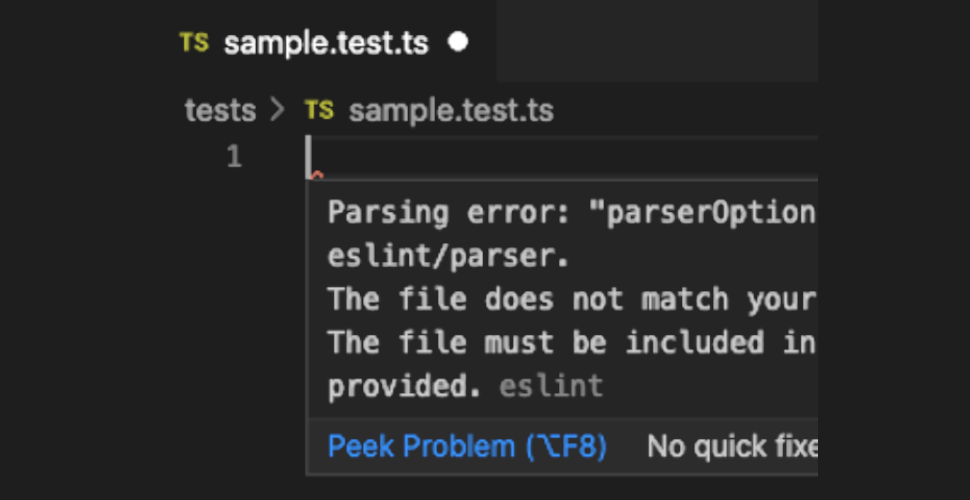
TypeScript のプロジェクトでプログラムのソースコードを src ディレクトリ下に、テストを tests ディレクトリ下に分けて格納するようにしました。 が、VSCode でテストファイルを開くとファイル先頭で必ずエラーが表示されるように・・・。 エラーの内容は Parsing error: "parserOptions.project" has been set for @typescript-eslint/parser. The file does not match your project config: tests/sample.test.ts. The file must be included in at least one of the projects provided.というもので、以下のように必ずファイルの先頭に表示されます。考えられる原因 どうやら tsconfig.json に tests 以下を含めないようにしているのが原因のようです。 { "compilerOptions": { // 省略 }, "include": ["src/**/*.ts"] }これはビルド時にテストファイルを含めないようにするためにそうしています。 しかし eslint の @typescript-eslint/parser もこのファイルを使っているために、このエラーが出てしまっているのでしょう。 { "parser": "@typescript-eslint/parser", "parserOptions": { "sourceType": "module", "project": "./tsconfig.json" } // 省略 }@typescript-eslint/parser にとっては、tests 以下は project に指定した設定に含まれていないぞ!と。 考えられる解決方法 解決方法は2通り考えられそうです。eslint 用には別の tsconfig.eslint.json を用意して、そちらには tests 以下を含めるようにする。 tsconfig.json には tests 以下を含めるようにし、ビルド用に tsconfig.build.json を用意してそちらには tests 以下を含めないようにする。[!WARNING] 注: 設定を変更した後に VSCode を再起動しないと反映されませんでした。tsconfig.eslint.json を用意する方法 tsconfig.json を extends に指定して、変更点(include)だけを上書きしたものを用意します。 { "extends": "./tsconfig.json", "include": ["src/**/*.ts", "tests/**/*.ts"] }このファイルを @typescript-eslint/parser が利用するように指定します。 { "parser": "@typescript-eslint/parser", "parserOptions": { "sourceType": "module", "project": "./tsconfig.eslint.json" } // 省略 }tsconfig.build.json を用意する方法 tsconfig.json には tests 以下も含めるように指定しておきます。 { "compilerOptions": { // 省略 }, "include": ["src/**/*.ts", "tests/**/*.ts"] }ビルド用の tsconfig.build.json を用意し、tsconfig.json を extends に指定して、変更点だけを上書きします。 { "extends": "./tsconfig.json", "compilerOptions": { // ビルド時にのみ指定したいものがあれば設定 }, "include": ["src/**/*.ts"], "exclude": ["tests/**/*.ts"] }ビルド時にこの設定ファイルを利用するように指定します。 { // 省略 "scripts": { "build": "tsc tsconfig.build.json" // 省略 } }どっちの解決方法がいいの? ビルド時にのみ指定したいコンパイラオプションがあるかどうかで変わってきそうです。 単に問題を解決したいだけなら tsconfig.eslint.json を用意するのがちょっとだけ簡単です。 ビルド時にのみ指定したいものがあるなら、共通設定を tsconfig.json に記載して、ビルド用に tsconfig.build.json を用意した方がいいでしょう。 いっそのこと tsconfig.eslint.json と tsconfig.build.json の両方とも用意して、共通設定を tsconfig.json に記載するというのも考えられます。これが一番柔軟です。 { "compilerOptions": { // 共通に設定するコンパイラオプション }, "exclude": ["node_modules"] }{ "extends": "./tsconfig.json", "compilerOptions": { // eslint でのみ適用したいものを指定 }, "include": ["src/**/*.ts", "tests/**/*.ts"] }{ "extends": "./tsconfig.json", "compilerOptions": { // ビルド時にのみ適用したいものを指定 }, "include": ["src/**/*.ts"] }